
v5.0
Never let the soul of animation give in to the whims of modernity.
Draw, rig, animate and render in one program. Painting, effects, compositing and 3D are in there too, so you can take a shot all the way from the first sketch to the final render.
No AI · lifetime updates · source code on request.
What is it? the short version
Orion Finale is a desktop animation program made by TVA. Draw and paint your frames, rig characters with the skeleton tool, animate them on the timeline, build effects in a node graph, bring in 3D through the bundled FD3D engine, then render the result. You don't need an account, there's no two-hour onboarding, and everything renders on your own machine.
I've tested it a lot, but if you find a bug, write to me. I'll fix it myself and send you a new version for free ASAP.
Draw & paint
Bitmap or vector animation, plus a built-in raster editor for touch-ups.
Layers
Add, remove, duplicate, reorder. Visibility, lock, opacity.
Effects & compositing
Effects are built in a drag-and-drop node graph. Add nodes, connect ports and adjust each node's controls. The graph rebuilds live as you go.
3D
Open the bundled FD3D editor and engine from inside Orion and put 3D scenes or render sequences on your timeline. Playback stays in sync automatically.
Cameras
Put a camera on your 2D canvas for pans, zooms and 2.5D moves.
Import & export
Import images, layered files, vectors, audio and 3D scenes. Export animations, image sequences or single frames. FFmpeg comes bundled.
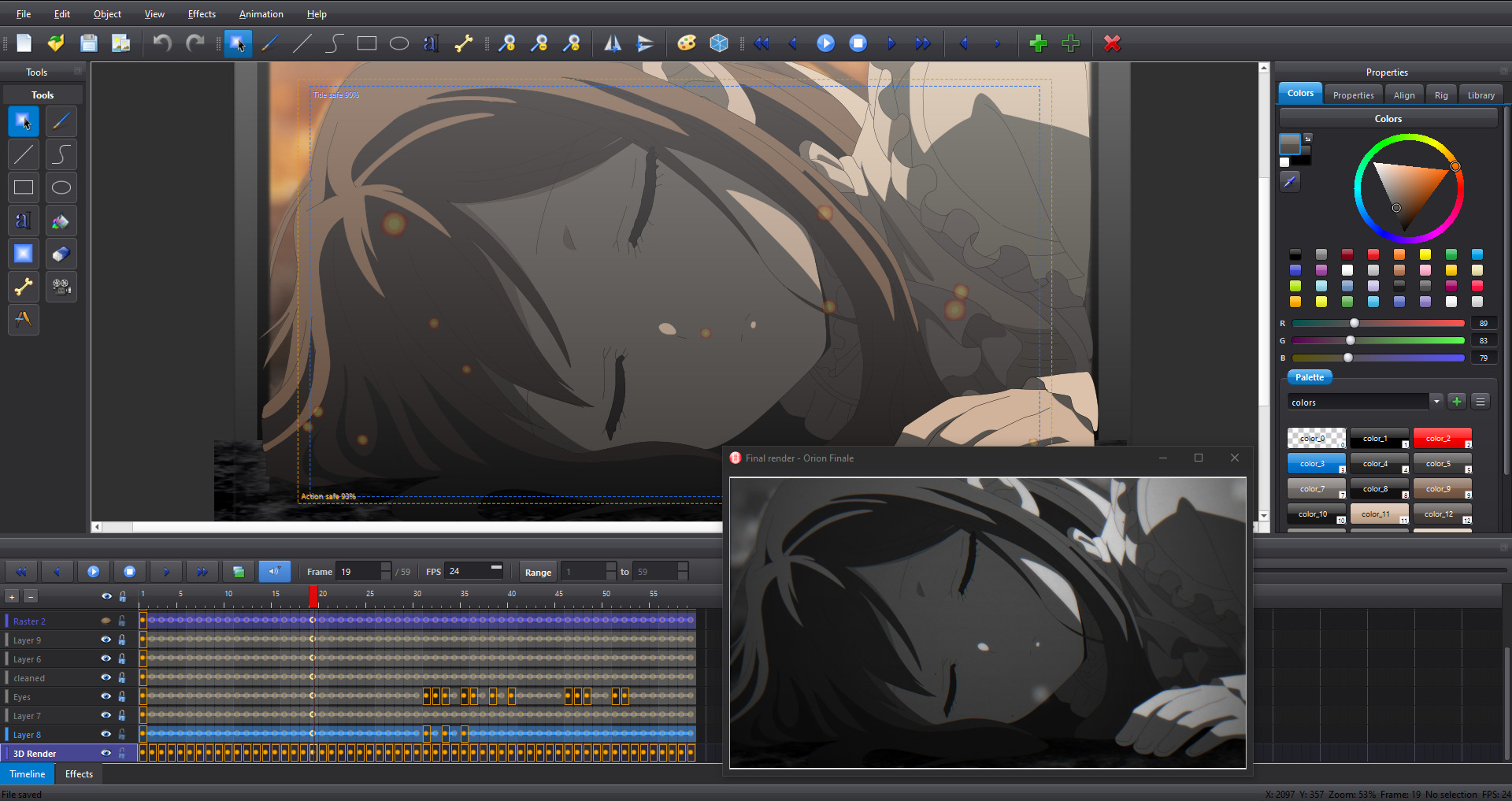
Screenshot the main window
Features the full list
Draw, paint & edit
- Tools: select, draw, line, curve, rectangle, ellipse, text, bucket fill, gradient fill, eraser and skeleton.
- Tools panel: set stroke width and color, switch selection modes and add cameras.
- Object editing: align & distribute, arrange (z-order), transforms (flip, rotate).
Layers
- Add, remove, duplicate and reorder layers.
- Per-layer visibility, lock, opacity, selection.
- Layer settings are saved with your project.
Import, export & final render
- File menu: new, open, save, save-as, autosave settings, canvas size.
- Import: image, layered image, vector, audio, 3D scene reference, 3D render sequence, camera track.
- Export: animation, image sequence, single frame, SVG.
- Built-in windows: a raster editor for paint touch-ups and a window for the final render.
Effects & compositing (node-based)
- Create nodes in the Effect Graph Panel by drag and drop.
- Drag links between ports, adjust per-node controls, and refresh or rebuild the graph.
- Effects menu in the main window with direct evaluator access.
3D with FD3D
- Open the bundled FD3D editor and the FD3D engine straight from Orion.
- Import 3D scenes and render sequences directly into your timeline.
- Playback & frame updates stay in sync with FD3D automatically.
Cameras, rigging & deformation
- Add and remove cameras from the Object menu.
- Skeleton tool for rigging and deforming characters (beta).
Plugins & bundled tools
- Plugin system for effects.
- Comes with FFmpeg and ImageMagick for encoding and image conversion.
Download & Buy 15-day trial included
If your 15-day trial is about to run out, or already has, you can buy a full license here.
Your license key will arrive by email a few minutes after you pay. When Orion Finale starts, enter the key and your email address on the activation screen. You need to be online to activate.
Payments go through PayPal. Hold on to the email with your key, since it's also your receipt.
System requirements
Minimum
| OS | Windows 10+ (Linux & macOS versions in the works) |
|---|---|
| GPU / API | OpenGL 3.3 Core compatible |
| Screen / project | 1366 × 768 |
Recommended
| Display | 1920 × 1080 or higher for comfortable editing (there's a built-in 1080p preset) |
|---|---|
| GPU | A card with reliable OpenGL 3.3 support, through native drivers or ANGLE |
What's in the box
- Orion Finale 5.0
- The FD3D editor & engine for 3D
- FFmpeg & ImageMagick
- A set of effect plugins
Contact form, email or Discord
Found a bug, want the source code, or just want to say hi? Drop me a note and I'll get back to you ASAP ^__^
If it's a bug, tell me what you were doing, what you expected and what happened instead. If I can reproduce it, I'll patch it and send you a new build for free as soon as I can. Also, if possible, you can contact me thru Discord and send me a screenshot or recording of the problem. That would help a lot actually